Redefine Data Paths
The Redefine Data Paths dialog allows you to redefine the location of your data files. This is most useful when you have moved your files to a new disk, or to a different machine. It does not physically move the files, but rather modifies the database to point to the new location of the files.
 How do I redefine a data path after moving seismic data?
-
Select the files that you want to redefine the paths for. If you are changing the paths for all files you can skip this step.
-
From the Tools menu select Redefine Data Paths.
-
In the Specify New Paths box, highlight the Original Path that is incorrect. Note: At this time, both the Original and New Path will be identical.
-
Click
 .
. -
On Set New Path dialog, click
 to
browse to the
correct data
location. Click
to
browse to the
correct data
location. Click  .
. -
The Specify New Paths box should have updated with the correct Old and New paths.
-
Click
to apply the changes
to the database.
General Information

Apply To
Specify which files to redefine the paths for.
All files: Apply the change to all the files in the database.
Selected files only:
Apply the change
only to files selected in the main dialog.
Specify New Paths
This will list all paths that exist for the either All Files or Selected Files. Select the path you want to modify.
Set New Path:
With a line selection, click this to enter the information for the new
path.
Set New Path
Use the Set New Path dialog to specify the new path for the seismic
lines.
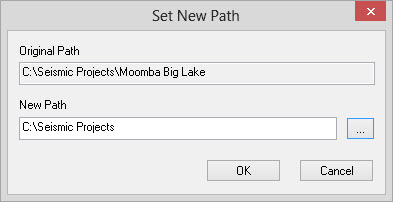
Original
Path:
The original data path.
New Path:
The new location of the
data files. You can type in a new location or select it using .
— MORE INFORMATION

|
Copyright © 2020 | SeisWare International Inc. | All rights reserved |