Getting Started: Seismic Viewer
How do I pick a fault?
Open the Pick Faults Dialog Box
You can open the Pick Faults dialog box in one of the following ways:
Click the Pick Faults icon (
 ) on the Seismic Toolbar.
Use the keyboard shortcut F.
From theFault menu select Pick Faults.
Pick a Fault
With thePick Faults dialog box open, specify the name of the fault to be picked either by selecting it from the drop down list, or by typing in a new name to create a new fault.

Select the properties for the fault including the Color and Type.
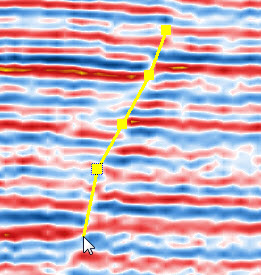
Click on the seismic section to insert the nodes that will trace the fault and then right click to finish the fault selection. A line will remain where the fault was picked.
Edit a Fault
Move a Fault Node: Left-click on the node and drag to a new position.
Delete a Fault Nodes: Left-click on the node and click Delete on the keyboard.
Insert a Fault Node: With the fault selected click the Insert key at the node location.
Delete Fault Segments: Select the segment and click Delete on the keyboard.
— MORE INFORMATION

|
Copyright © 2020 | SeisWare International Inc. | All rights reserved |