Grid Shortcut Menu
Right click on the selection list to access these options.
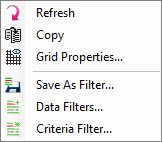
Refresh:
Refresh the selection list. This may be necessary when multiple users
are accessing a project, or you are working in multiple applications in
the same project at one time.
Copy: Create a copy of the selected grid(s). Creating a copy of a grid will transfer ownership to the current user, allowing you to perform operations on horizons that aren't your own. This will also allow you to perform an operation on a copy of a grid that you own, without altering the original version.
Grid Properties: Open the Grid Properties window.
Save As Filter: Save the currently selected items as a filter.
Data Filters: Open the Data Filters window to see a list of filters that currently exist in your project, or to create a new one.
Criteria Filter: Open the Criteria Filter window to create a filter based on data type, an existing filter, or an expression.
Copy: Create a copy of the selected grid(s). Creating a copy of a grid will transfer ownership to the current user, allowing you to perform operations on horizons that aren't your own. This will also allow you to perform an operation on a copy of a grid that you own, without altering the original version.
Grid Properties: Open the Grid Properties window.
Save As Filter: Save the currently selected items as a filter.
Data Filters: Open the Data Filters window to see a list of filters that currently exist in your project, or to create a new one.
Criteria Filter: Open the Criteria Filter window to create a filter based on data type, an existing filter, or an expression.
— MORE INFORMATION

|
Copyright © 2020 | SeisWare International Inc. | All rights reserved |