Match Criteria
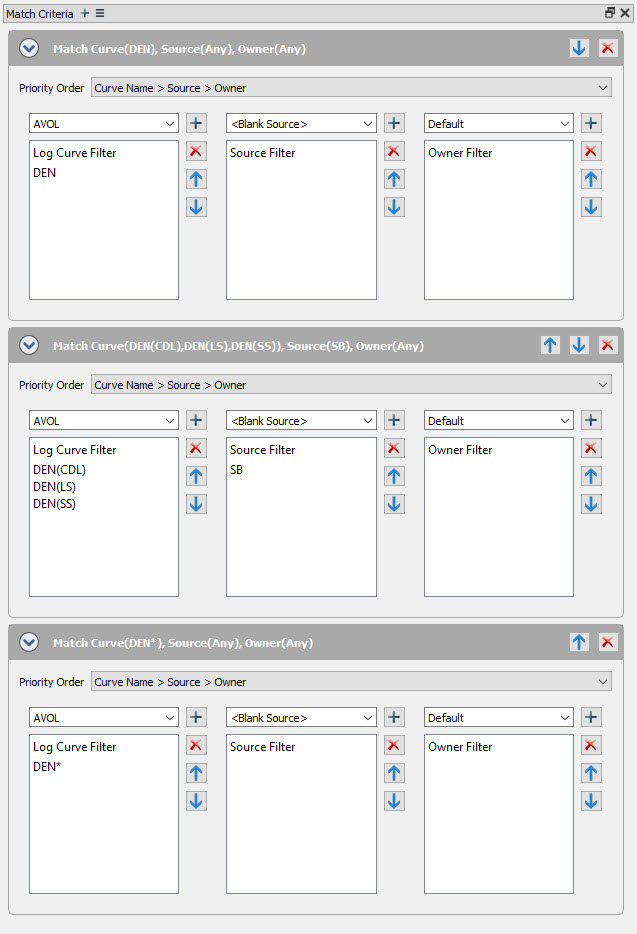
Match Criteria in Curve Aliasing is used to create rules for your curve aliases. Each rule can have multiple curves or expressions, sources, and owners that are each given a hierarchical order. You can also select a priority order between Curve Name, Source, and Owner. Each curve alias can have multiple "or" rules that can also be arranged in a hierarchy format.
Options

 Add Match Criteria: Adds a new Match Criteria to the selected curve alias. Note: You can add multiple Match Criterias to a curve alias.
 Options: Option to expand or collapse all Match Criteria.
Match Criteria Priority

 Expand/Collapse: Expands or collapses the selected Match Criteria.
 Increase priority: Moves the Match Criteria up one priority level.
 Decrease priority: Moves the Match Criteria down on priority level.
 Delete: Deletes the Match Criteria.
Match Criteria Properties
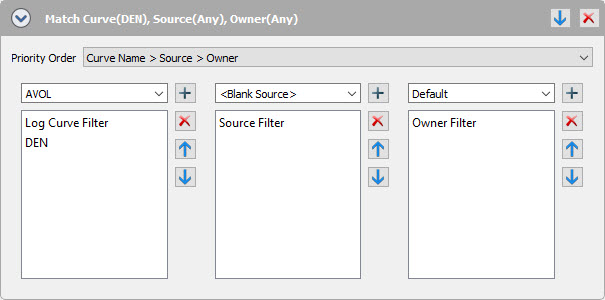
Priority Order: Select the category priority. You can choose between Curve Name> Source > Owner and Curve Name > Owner > Source.
Log Curve Filter: Use the drop down to select a log curve, or type in an expression. To add your selection click  and
and  to delete the selection.
Source Filter: Use the drop down to select a source.
Owner Filter: Use the drop down to select an owner.
Note: You can use as many log curves, expressions, sources, and owners in your Match Criteria.
— MORE INFORMATION

|
Copyright © 2020 | SeisWare International Inc. | All rights reserved |