Import Culture: Point Properties
This page is available when you import a columnar ASCII file, and, on the Other Parameters page, select Treat as Single Points. This is specifically used for importing microseismic data, but can have other applications.
Using information from the import file, you can automatically generate a table of values that specifies the color and/or size property that will be applied to each object based its value. The data ranges, colors, and sizes can then be manually edited directly in the table so you can create a meaningful display in your project.
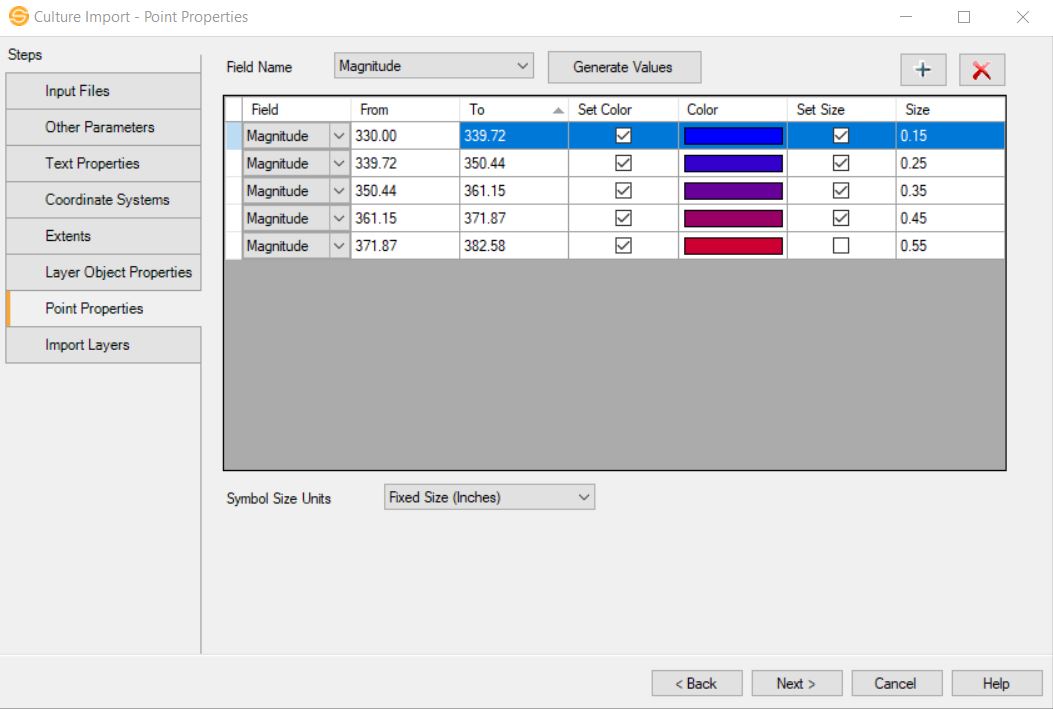
Symbol Size Units:Select the display units for the symbols in fixed size (inches) or variable size (meters).
Field Name: Select the attribute. This list is generated from using the manually defined columns in the Columnar ASCII file, and may include time, stage, magnitude and amplitude.
 Generate Values: After selecting a Field Name, click this button to open the Select Intervals dialog box.
 Add: Add a row to the table of values, and then manually add information to the table.
 Delete: Delete the selected row from the table of values.
— MORE INFORMATION

|
Copyright © 2020 | SeisWare International Inc. | All rights reserved |