Well Curve Calculator: Calculator
The Calculator page allows you to create the operation, and complete the curve calculation.
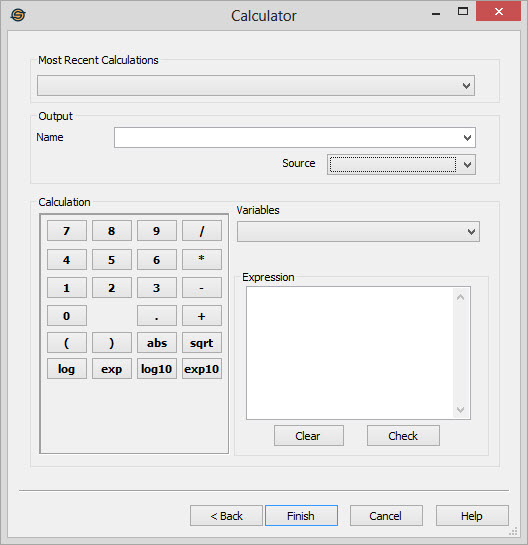
Recent Calculations
Most Recent
Calculations: This drop down
contains a list of the most recent well curve
calculations. Select an item from this list to quickly redo
calculations after you have modified your curves.
Output
Name:Specify the name of a curve to write as the output. You can select an existing curve, or type in the name of a new curve.
Output Source:Specify
a source for the well curves that will be output. You can
leave
this blank, or specify an existing source.
Calculation
Variables: Use the drop down to enter a well curve name into the expression.
Expression: Displays the final output computation expression. The expression is created by selecting Variables and from the drop down, and using the keypad to select operators and constants.
Note on operators:The operators are all unary operators. They require one value after the operator on which the operator will be performed. That value may be a grid. Thus, the expression abs "Grid A" will compute the absolute value of "Grid A". The abbreviations used are: abs (absolute value), sqrt (square root), log (natural log), exp (natural exponent), log10 (log base 10), and exp10 (exponent base 10).
 Clear: Erase the existing
expression.
Clear: Erase the existing
expression.
 Check: Performs a check to ensure
the
expression is valid. No output is created.
Check: Performs a check to ensure
the
expression is valid. No output is created.
— MORE INFORMATION

|
Copyright © 2020 | SeisWare International Inc. | All rights reserved |